×
NetEffect Joins Taazaa to Expand Enterprise AI, Platform Integration, and Modernization Services. Learn more
Categories
AEM

Adobe Brand Visibility: What Your AEM Setup Needs to Get Full Value 

Key Takeaways 

  • Adobe Brand Visibility, formerly Adobe LLM Optimizer, is Adobe’s complete GEO platform combining AI visibility monitoring, content optimization and revenue measurement in a single workflow. 
  • It tracks brand presence across at least 10 LLM families including ChatGPT, Perplexity, Google AI Mode, Claude and Microsoft Copilot, and benchmarks your visibility against up to five competitors. 
  • The AEM setup requirements that determine how much value Brand Visibility delivers are the same ones that determine broader AI readiness: content structure, metadata consistency and crawler accessibility. 
  • AEM Edge Delivery Services customers have a head start. EDS’s clean HTML and 100 Lighthouse score baseline are exactly what AI agents need to read and cite content reliably. 

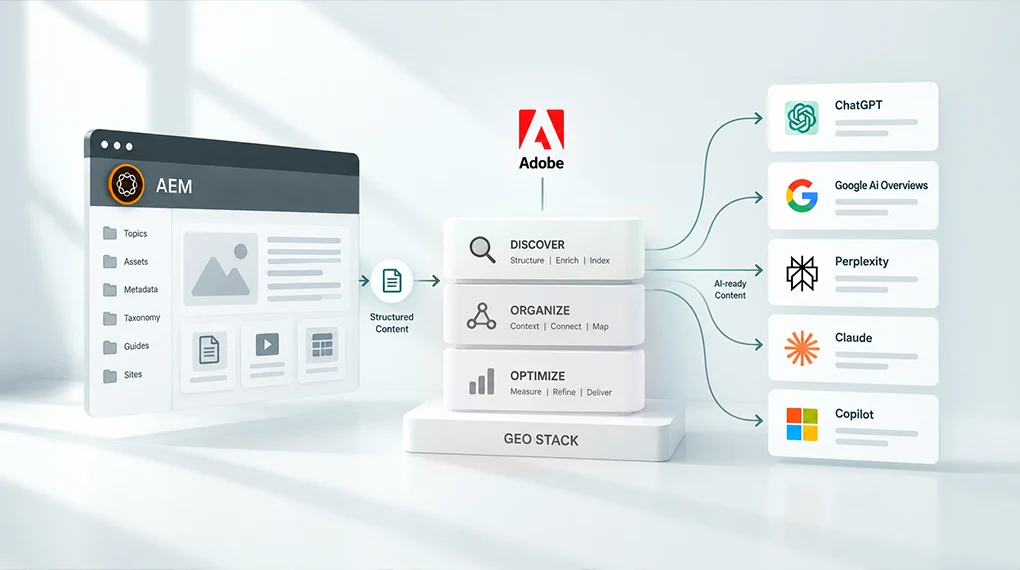
Adobe Brand Visibility is Adobe’s GEO stack: a unified platform that monitors how your brand appears across AI search engines, identifies what’s blocking visibility and deploys fixes directly to your AEM environment without requiring an engineering sprint. It works, but only as well as the AEM setup underneath it. This post explains what the platform does and what your AEM environment needs to have in place before it delivers full value. 

What Adobe Built and Why It Matters Now 

For most of the past decade, enterprise marketing teams optimized for one thing: ranking in Google search results. The playbook was well understood. Keywords, backlinks, page speed, structured data. The work was measurable and the outcomes were predictable. 

That old playbook still works about as well as it ever did. It just doesn’t cover where customers are looking anymore. 

AI-powered search is now a primary discovery channel. Adobe Digital Insights has tracked AI traffic to U.S. retail sites surging 1,324 percent between October 2024 and May 2026, with travel growing even faster at 2,215 percent over the same span. When a potential customer asks ChatGPT, Perplexity or Google AI Mode which platform is best for enterprise content management, which vendor leads for regulated industries or what the difference is between two competing products, they aren’t getting a ranked list of links. They’re getting a synthesized answer. Your brand is either in that answer or it isn’t. 

Adobe recognized this shift and built an entire product layer to address it. The result is Adobe Brand Visibility, announced June 17, 2026, as part of Adobe CX Enterprise. It combines the capabilities of Adobe LLM Optimizer with Semrush’s AI search database of nearly 300 million real AI search prompts in a single enterprise workflow. AEM customers don’t need to be sold on using it. The harder question is whether their AEM environment is set up to get the most from it. 

What Adobe Brand Visibility Actually Does 

Understanding the product before understanding the AEM requirements makes the connection between the two clearer. 

AI Visibility Monitoring 

Adobe Brand Visibility tracks brand visibility across at least 10 LLM families, including ChatGPT, Perplexity, Google AI Mode, Anthropic Claude and Microsoft Copilot, with competitive share-of-voice benchmarking against up to five direct competitors. It tells you not just whether your brand appears in AI answers, but how prominently, how accurately and against which queries. 

This monitoring layer uses CDN log analysis to identify AI agent traffic. That’s significant because standard analytics platforms can’t see AI bot traffic clearly. Adobe Brand Visibility can, and it connects that traffic to downstream engagement and revenue through native Adobe Analytics and Customer Journey Analytics integrations. 

Citation Readability Scoring 

The product includes a Citation Readability Score for each page, showing how much of your content AI agents can actually read and use. A companion Chrome extension, the AI Content Visibility Checker, lets teams run this check on any page without a product license. Practitioner guidance from Adobe frames a side-by-side comparison of what AI agents see versus what human visitors see as one of the most persuasive artifacts you can bring to a GEO investment conversation, particularly on your highest-value pages. 

Opportunity Identification and Deployment 

Adobe Brand Visibility surfaces prioritized recommendations and enables teams to act on them immediately. Fixes deploy in two ways: at the CDN edge in minutes without a CMS update, or through CMS updates for durable changes that persist. CDN edge deployment targets AI agents only and has no effect on the human visitor experience or existing SEO signals. 

The platform also covers off-site optimization: generating content for Wikipedia, YouTube, Reddit and earned media to expand citation authority on the third-party surfaces LLMs weight most heavily when forming answers. 

Revenue Measurement 

The Adobe Analytics integration connects every GEO optimization directly to conversions and revenue, with server-level confirmation that AI bots read the updated content. This moves GEO from a brand awareness exercise to a measurable growth initiative with numbers leadership already trusts. 

The AEM Requirements That Determine How Much You Get From It 

Adobe Brand Visibility is available as a free trial for AEM Cloud Service, Adobe Analytics and Customer Journey Analytics customers. Customers who activated before April 1, 2026 keep up to 200 prompts under their original terms. Everyone else gets up to 100 prompts, one domain and optimizations across up to 50 URLs for a single opportunity type. For most enterprise AEM teams, though, licensing isn’t what slows this down. Their AEM environment is. 

Key products supporting the solution include AEM Sites, AEM Sites Optimizer and Adobe Brand Visibility working together. They’re designed as an integrated stack. The monitoring layer shows you the gaps. The optimization layer closes them. But the underlying AEM environment determines how wide those gaps are in the first place. 

Here’s what matters most. 

1. Content Must Be Readable by AI Crawlers 

This is the most immediate and most frequently overlooked requirement. AI agents can’t cite content they can’t read. 

JavaScript-rendered content, gated pages, assets without text equivalents and pages that block AI crawlers in robots.txt are invisible to AI search regardless of their quality. According to Adobe’s data on US retail site AI readability, the average homepage scores only 75 percent on AI content readability. That means roughly a quarter of homepage content is effectively hidden from the AI systems your brand depends on for discovery. 

For AEM teams, the most common readability gaps show up in a handful of predictable places. Single Page Applications that render content in JavaScript rather than serving it as static HTML top the list. Pages that don’t include server-rendered fallback content for AI agent user agents are a close second. DAM assets, PDFs and video content without machine-readable text equivalents create another blind spot, and robots.txt configurations that inadvertently block AI crawlers alongside other bots round it out. 

Adobe’s own guidance points to a consistent fix for the SPA problem: adding a server-rendered block on every page template containing an AI-readable summary. Simple to implement. High impact. (#LINK-TBD: source claim needs Mitch’s confirmation, see pipeline report) 

2. Content Structure Determines Extractability 

AI systems don’t read pages the way human visitors do. They extract facts, assess credibility and synthesize answers from multiple sources. For that extraction to work accurately, content needs clear structure: direct answers near the top of the page, consistent entity naming and organized headings that signal what each section covers. 

AEM’s content fragment and experience fragment architecture is well-suited to this when it’s used correctly. Content fragments that are built around structured fields with consistent naming produce more reliable AI citations than pages built as free-form rich text. The content model decisions made during AEM implementation, or during a migration, directly affect how well AI systems can extract and use your content. 

For teams thinking through how content architecture connects to AI visibility, this post on what AI search actually looks for in your content covers the structural signals that determine whether content gets cited or skipped. 

3. Metadata Consistency Across the DAM 

Brand Visibility identifies content gaps based on real AI search prompts. When it recommends adding a page or updating existing content to address a visibility gap, that content needs to be findable, reusable and correctly tagged inside your AEM environment to be deployed quickly. 

A DAM with inconsistent taxonomy or missing metadata makes that process slower and less reliable. The right asset for a given gap may already exist in your DAM. If it can’t be found because the tagging is inconsistent, the optimization cycle extends from minutes to days. 

For teams still working through DAM governance and taxonomy decisions, this post on why your content supply chain, not your content team, is the real bottleneck covers how metadata decisions upstream affect content velocity downstream, which is exactly the dynamic that GEO optimization surfaces. 

4. AEM Cloud Service Shapes Your Trial Path, Not Your Deployment Ceiling 

The free trial gate described above is the main AEM-specific eligibility rule, and it’s worth separating from a claim that circulates often and isn’t accurate: that CDN edge deployment only works for AEM. It doesn’t. Optimize at Edge, the feature that pushes fixes live in minutes without a CMS update, is CDN-agnostic and CMS-agnostic. It’s documented to work with Fastly, Akamai and Cloudflare, on any content management system. 

Where AEM does matter is setup friction. AEM Cloud Service customers on Adobe’s managed Fastly get a self-serve, close to one-click routing setup inside the Brand Visibility UI. Fastly customers running their own instance configure it through VCL snippets instead, which typically means pulling in a developer. The same is true for Akamai and Cloudflare. So the practical AEM advantage isn’t exclusivity. It’s that AEM Cloud Service on managed Fastly is the fastest path from opportunity to live fix, with the least engineering involved. 

For teams weighing what their current deployment model means for broader AI agent access, our post on AEM 6.5 end of support and the three paths forward digs into what each option means for platform capability going forward.  

5. AEM Edge Delivery Services Teams Have a Head Start 

AEM Edge Delivery Services teams already have a meaningful advantage in AI search visibility. EDS produces clean, server-rendered HTML by default. The 100 Lighthouse score that EDS achieves as a baseline reflects exactly the kind of fast, well-structured, fully readable pages that AI agents cite most reliably. 

EDS’s plain JavaScript and CSS front-end model also eliminates the SPA rendering problem that creates the largest AI readability gaps in traditional AEM Sites implementations. If you’re on EDS, your pages are already structured to be read by AI. Brand Visibility lets you measure and optimize that advantage rather than first diagnosing why content is invisible. 

For teams evaluating a move to EDS as part of their broader AI readiness strategy, this post on how AEM hits a 100 Lighthouse score with Edge Delivery Services covers the performance architecture that makes EDS the strongest starting point for GEO work. 

What This Looks Like in Practice 

Before Brand Visibility’s wider launch, Adobe’s own marketing team ran the underlying LLM Optimizer technology on Adobe.com, testing it against the Firefly and Acrobat landing pages. The team identified gaps in how product descriptions, ratings and reviews were surfacing in AI answers. Automated recommendations resolved the issues without disrupting the visitor experience. Within one week, citations increased by five times for Adobe Firefly. Adobe Acrobat saw a 200 percent increase in LLM visibility versus competitors, and a 41 percent increase in LLM-referred traffic to Adobe.com pages. 

Those numbers reflect what happens when Brand Visibility runs on top of an AEM environment with clean content structure, readable pages and consistent metadata. The tool identified the specific gaps. The AEM infrastructure allowed them to be fixed quickly. The result was measurable within a week. 

In our work with enterprise AEM environments, the organizations seeing the fastest GEO returns from Brand Visibility are consistently the ones that addressed content readability and metadata consistency before activation, not alongside it. 

The Starting Point 

Adobe Brand Visibility is live now, with a free trial open to AEM Cloud Service, Adobe Analytics and Customer Journey Analytics customers. Before activating, the most useful first step is running the AI Content Visibility Checker on your 10 highest-value pages. Product pages, solution descriptions, thought leadership content, pricing pages and FAQs are the highest-priority targets. The Citation Readability Score for each page tells you exactly how much of your content AI agents can currently use. 

That score is your baseline. It tells you whether your AEM environment is ready to get full value from Brand Visibility immediately, or whether content readability and metadata work needs to happen first. 

For teams who want help mapping their current AEM setup against Brand Visibility’s requirements and identifying where the fastest GEO gains sit, a Focus Area Audit is the right starting point. 

Book a Focus Area Audit 

Frequently Asked Questions 

What is Adobe Brand Visibility and how does it relate to LLM Optimizer?

Adobe Brand Visibility is the evolution of Adobe LLM Optimizer, launched June 17, 2026 after Adobe combined it with Semrush’s AI search intelligence following Adobe’s acquisition of Semrush, completed April 28, 2026. It combines AI visibility monitoring, content optimization and revenue measurement in a single platform. The core GEO functionality is the same; the intelligence layer is significantly expanded. 

Does Adobe Brand Visibility work with any CMS or only AEM?

The free trial requires AEM Cloud Service, Adobe Analytics or Customer Journey Analytics. Once you’re using the product, the monitoring, analysis and CDN edge deployment capabilities are CMS-agnostic. Optimize at Edge works with Fastly, Akamai or Cloudflare regardless of what CMS sits behind them. AEM Cloud Service customers on Adobe’s managed Fastly get the simplest setup: a self-serve, near one-click flow. Everyone else configures it through CDN-specific steps, usually with a developer’s help. 

Can we use Adobe Brand Visibility if we’re still on AEM 6.5 or LTS on-premise?

The monitoring and citation readability analysis work for any publicly accessible site regardless of CMS. The free trial is gated to AEM Cloud Service, Adobe Analytics or Customer Journey Analytics customers, so an on-premise AEM 6.5 environment without one of those wouldn’t qualify for the trial on its own. For the paid product, CDN edge deployment isn’t limited to AEM. If your site sits behind Fastly, Akamai or Cloudflare, Optimize at Edge is available regardless of what’s on-premise or in the cloud. Confirm current trial and licensing terms with your Adobe rep before committing content ops time to it.

How quickly do GEO optimizations take effect?

CDN edge optimizations deploy in minutes and include server-level confirmation that AI bots read the updated content. CMS-based updates follow normal publishing workflows. Adobe Brand Visibility includes rollback capability for CDN edge changes, with no impact on the human visitor experience or existing SEO signals. 

What is the relationship between AEM Sites Optimizer and Adobe Brand Visibility?

AEM Sites Optimizer focuses on technical site performance, Core Web Vitals and SEO health inside AEM. Adobe Brand Visibility focuses on AI search visibility, citation monitoring and GEO optimization. Both are positioned as working together as part of the broader brand visibility stack alongside AEM Sites and Adobe Analytics. 
Categories
AEM

Replatforming to AEM: A Guide for Teams Leaving Another CMS

Key Takeaways

  • Replatforming to AEM isn’t a lift-and-shift exercise. Content architecture and governance decisions made during migration determine how much of AEM’s capability your team can use after go-live.
  • Adobe provides a phased migration framework including the Best Practices Analyzer, the Content Transfer Tool and the Experience Modernization Agent, each with a specific role in reducing migration risk.
  • The most expensive migration mistakes happen before any content moves: skipping readiness assessment, carrying forward broken taxonomy and under-resourcing governance design.
  • AEM as a Cloud Service is the only deployment model that supports the full AI agent layer, Edge Delivery Services and continuous governance.
  • Content migration and code migration are separate workstreams with different timelines and risk profiles, and treating them as one project is a leading cause of go-live delays.

Why Teams Leave Their Current CMS

The decision to replatform rarely starts with a technology preference. It starts with a business problem the current platform can no longer solve.

The patterns are consistent. Content teams are producing more output with the same headcount, and the platform wasn’t built for that volume. Personalization is on the roadmap, but connecting audience data to content delivery requires custom development the current CMS was never designed to support. Governance breaks down under deadline pressure because it depends on manual steps rather than system controls. And AI tools end up living around the platform, not inside it.

AEM as a Cloud Service addresses each of these, but only when the team treats the migration as a strategic program rather than a technical one. NetEffect’s case study on unifying 180 websites with AEM shows what that business case looks like in practice across a large-scale, multi-site environment.

What Makes AEM Migration Different

Most CMS migrations involve moving content from one structured system to another. AEM migration involves that plus several dimensions that need separate planning.

Content architecture isn’t portable. AEM organizes content as pages, content fragments, experience fragments and components. That structure is fundamentally different from most other CMSs. Migrating raw content without redesigning the architecture for AEM’s model creates a rework backlog that surfaces after go-live, not before.

Integrations require rearchitecting. Custom integrations with DAMs, CRMs, analytics platforms and marketing automation tools rarely port directly to AEM. Each one needs evaluation against AEM’s API-driven architecture and independent testing.

Teams need to redesign governance, not replicate it. Carrying forward the governance model from the old CMS misses the opportunity to build compliance controls into the platform from the start. Migration is the right moment to define metadata standards, permission structures and approval workflows correctly, before content populates the new environment.

Deployment model choice affects everything downstream. AEM as a Cloud Service is the only deployment model that supports the full AI agent layer, Edge Delivery Services, continuous governance and HIPAA readiness. For teams weighing this decision, this guide on AEM cloud versus on-premise deployment covers what that choice means for long-term capability.

Adobe’s Migration Framework: Four Phases That Determine Outcomes

Phase 1: Readiness Assessment

The readiness phase determines what the migration will actually involve before any content moves.

Adobe’s Best Practices Analyzer scans an existing AEM environment and flags what needs to change before a move to Cloud Service, cutting out a lot of the manual assessment work teams would otherwise have to do by hand. For teams migrating from a non-Adobe CMS, the equivalent work involves a content audit of the source platform, an integration inventory and a governance gap analysis.

In our experience, the teams that skip this phase and move directly to execution consistently encounter mid-migration scope changes that cost more to resolve than the readiness work would have. The output isn’t a project plan. It’s a realistic picture of complexity that informs one.

Phase 2: Content Architecture Design

This phase decides how the team will structure content in AEM before migration begins. Content model design determines how pages, content fragments and experience fragments fit together. Taxonomy and metadata schema decisions determine which fields you require, how you tag assets and how you classify content. URL structure and redirect mapping determine how you preserve or redirect existing URLs. And the governance model, meaning permissions, approval workflows and rights management, needs to be locked in before content arrives.

The taxonomy and metadata decisions made here have the longest-lasting impact on post-go-live capability. A clean, consistently enforced taxonomy is what makes personalization, AI-assisted authoring and DAM discoverability work. For teams building that foundation, our piece on why content architecture determines AI readiness covers the structural prerequisites that migration teams should treat as design requirements, not post-migration optimizations.

Phase 3: Content Migration Execution

Adobe’s Content Transfer Tool handles the mechanics of moving content from an existing AEM instance into the new Cloud Service environment. For teams migrating from a non-Adobe CMS, the equivalent is a bulk import process that maps source content into AEM’s content model.

Adobe recommends a phased approach to the actual move. Turn off asset processing workflows before ingestion starts, since running them during ingestion tends to degrade performance. Ingest the assets first and run processing workflows afterward in batches. Run the ingestion in wipe mode on the target environment so the team starts from a clean state, and validate content rendering after each batch before moving to the next one.

We consistently see content migration and code migration work best as parallel but separate workstreams. Combining them creates dependencies that slow both down and make issues harder to isolate when they surface.

Phase 4: The Experience Modernization Agent

For teams migrating from another CMS into AEM with Edge Delivery Services, Adobe’s Experience Modernization Agent is a significant accelerator. Per Adobe’s own documentation, it works across a wide range of source CMS platforms and can turn a migration that would normally take months into a matter of weeks or even days. Its capabilities cover the heavy lifting: importing pages in bulk, pulling design systems from an existing site, rebuilding navigation and pulling content through web scraping where needed.

Every change still runs through a GitHub-based review workflow before it goes live, so developers keep full authority over what ships. Speed doesn’t come at the cost of governance.

The CMS Migration Checklist

Before migration begins. Document the business case with specific capability gaps in the current CMS, and confirm the deployment model as AEM as a Cloud Service. Complete a content audit covering volume, types, age and quality, along with an integration inventory that assesses every connected system. Identify governance gaps across metadata, permissions and approval workflows.

During architecture design. Design the content model for AEM’s fragment and component architecture, with a metadata schema that enforces required fields at the system level. Complete and validate the URL mapping and redirect strategy, and document permission structures and approval workflows.

During content migration. Disable asset processing workflows before bulk ingestion begins. Migrate content in batches and validate rendering after each one, test and verify redirect mapping, and validate search and metadata accuracy.

Before go-live. Test every integration at production data volumes, and test permission structures for every user group. Validate performance with production-representative content, document and test the rollback plan, and resource and schedule the stabilization period.

For the implementation sequence behind this checklist, this phase-based AEM implementation roadmap maps each decision to the correct point in the program timeline.

What to Expect After Go-Live

A well-executed AEM migration doesn’t deliver its full return at go-live. It delivers a platform capable of that return as the team activates capabilities in sequence.

Phase

Timeframe

Focus

Stabilization

Weeks 1-4

Monitor, resolve issues, validate performance

Content operations

Months 2-3

AI-assisted authoring, DAM discoverability, workflow optimization

Personalization

Months 3-6

AEP connectivity, audience-content matching

AI agent layer

Months 6-12

Governance Agent, Experience Production Agent

Full optimization

Ongoing

Performance tuning, content supply chain refinement

Teams that sequence activation deliberately outperform those that try to activate everything at once. The migration creates the foundation. Each phase builds on it.

Starting the Conversation

A 30-minute conversation with the NetEffect team can map your current CMS limitations against AEM’s capability set, identify the migration complexity specific to your environment and outline what a realistic program looks like from readiness assessment to stabilization.

Book a Focus Area Audit

Frequently Asked Questions

Q1. How long does an AEM migration typically take?

Simple migrations with limited integrations and a clean content structure typically complete in three to four months. Complex enterprise migrations with many integrations and multi-site requirements typically run 6 to 12 months. The readiness assessment produces a realistic timeline for your specific environment before the program begins.

Q2. Can we migrate from any CMS to AEM?

Yes. Adobe’s Experience Modernization Agent supports migrations from a wide range of CMS platforms into production-capable Edge Delivery Services projects. The migration path varies by source platform complexity, but no CMS is categorically incompatible with AEM.

Q3. Should we migrate all content or start with a subset?

Starting with your highest-traffic or most business-critical pages allows you to validate the content architecture, integration connections and governance model before committing to full migration. Adobe’s Content Transfer Tool supports phased migration with batch ingestion and validation.

Q4. What happens to our SEO during migration?

Every URL that changes needs a validated redirect to preserve SEO equity and prevent 404 errors. Redirect mapping is consistently underestimated in migration planning and is one of the most common causes of post-launch performance degradation. Complete and test it before go-live, not after.

Q5. How does AEM migration connect to AI readiness?

The content architecture, taxonomy and governance decisions made during migration directly determine AI readiness after go-live. Our piece on why content architecture determines AI readiness covers the specific prerequisites that migration teams should treat as design requirements.

Categories
AEM

Understanding DITA: How Structured Content Transforms Enterprise Documentation in 2026

Key Takeaways

Something has shifted in how we interact with information. We don’t read documentation anymore. We pull fragments from smartwatches, ask AI assistants quick questions, scan augmented reality overlays for maintenance instructions. The old 200-page PDF sitting in a SharePoint folder? It’s become a liability.

For enterprises managing complex product lines, this reveals an uncomfortable truth: most institutional knowledge remains trapped in what we call “unstructured” formats. Word documents, flat HTML pages, legacy PDFs. The content exists, but it can’t flow to the places it needs to go.

Darwin Information Typing Architecture (DITA) offers a way forward. It’s an XML-based framework that moves content away from static files and into a modular, intelligent system. And in 2026, with AI reshaping how users discover and consume information, DITA isn’t just for technical writers. It’s becoming the backbone of serious information strategy.

What is DITA?

DITA is an open-standard XML data model designed specifically for technical content. That sounds abstract, so let’s make it concrete. In a typical Word document, a heading is just text with bigger font. The software doesn’t know whether that heading introduces a safety warning or a product specification. It’s formatting without meaning.

In DITA, every element carries semantic identity. A heading knows if it belongs to a Task, a Concept or a Reference. The content isn’t just formatted; it’s classified. According to Adobe’s documentation, this approach “enables native DITA support in Experience Manager, empowering AEM to handle DITA-based content creation and delivery” through tools like Adobe Experience Manager Guides.

The name itself reveals the philosophy behind the standard. “Darwin” refers to principles of specialization and inheritance, borrowing from evolutionary biology. Organizations can adapt the standard XML structures to meet specific industry needs without breaking the underlying architecture.

“Information Typing” means categorizing content by its purpose. “Architecture” signals that this is a structural framework, not merely a file format.

Think of it this way: DITA turns your company’s knowledge into a library of smart building blocks. Instead of rewriting a safety warning for 50 different product manuals, you write it once and point all 50 manuals to that single source. When the legal team changes the wording, every document updates automatically.

Why Structured Content Management Matters Now

Here’s the hurdle most enterprises face: a document-first mindset. When you write in a standard word processor, your content is unstructured. The software can’t distinguish between a product price and a phone number. It sees characters and pixels, nothing more.

Structured content management flips this around. Information gets organized into small, self-contained pieces that carry metadata. These pieces, called topics, allow computers to “understand” what they’re processing.

Why does machine-readability matter so much in 2026? Consider what happens when a customer asks an AI assistant: “How do I reset the valve on model X-500?” A structured system can pull the exact Task topic for that specific model and serve a precise answer. An unstructured system? It might point the user to a 400-page PDF and wish them luck.

Use structured headers (H1, H2, H3) for better parsing by AI systems and LLMs to prioritize fresh content that’s organized semantically. The connection between structured content and AI visibility isn’t theoretical. It’s becoming an operational requirement.

The Three Topic Types That Keep Content Clean

DITA enforces a strict separation of information types to prevent what we might call “content blurring,” where conceptual explanations get tangled with step-by-step procedures.

Adobe Experience Manager (AEM) Guides supports creating DITA topics of type: topic, task, concept, reference, glossary, DITAVAL, Markdown and more.

Task Topics provide step-by-step instructions. They tell users how to accomplish something specific, following a strict “Prerequisites, Steps, Result” structure. No wandering explanations allowed.

Concept Topics offer background information. They explain what something is or why it matters. Essential context, kept separate from the doing.

Reference Topics contain facts and data. Think specifications, API documentation, parts lists. Designed for quick lookups rather than narrative reading.

Why bother with this separation? Precision. If a product’s specifications change, you update only the Reference topic. You don’t hunt through 20 different Task documents to find where that spec might have been mentioned in passing. Each piece of content exists independently, ready to be assembled into whatever output the situation requires.

Cutting the Translation Tax

For global enterprises, localization represents one of the highest recurring costs in the content lifecycle. In traditional workflows, changing one sentence in a 100-page manual often means resending the entire document for translation. Multiply that across 20 languages and several updates per year. The math gets painful quickly.

DITA changes the equation. Adobe notes that AEM Guides provides industry-leading translation management and localization support that delivers significant savings on translation time and costs.

How does this work in practice? Because content is modular, you send only the specific topics that were edited. Translation memory becomes far more effective. If 10 products share 90 percent of the same features, you translate that shared content once. DITA also separates content from style, so you don’t manually fix the layout of Japanese or Arabic manuals. The system applies localized formatting automatically.

The platform even tracks which topics have been modified since the last translation. You can view the status of each topic, whether it requires re-translation or not and send only out-of-sync content for processing.

The Economics of Content Reuse

Content reuse sounds like a buzzword until you see the numbers. Adobe’s documentation describes how AEM Guides allows you to find and select relevant content faster, maximizing the ROI on content with every reuse through comprehensive search across the entire repository.

Consider a manufacturing company with generic topics for safety precautions.

Those warnings can be referenced and adapted across specific user manuals for each machine model, reducing redundancy while ensuring core safety information stays consistent.

In traditional publishing, if a safety warning or a brand name changes, you must find every document that contains that string and update it manually. This creates a massive ‘coordination tax’ on your editorial team.

DITA provides two mechanisms for reuse. Map-Based Reuse creates digital blueprints that pull the same topic into different contexts. A single Safety Procedures topic can appear in a User Manual, a Technician Guide and an Internal Training deck simultaneously. Content References allow fragment-level reuse, storing paragraphs like legal disclaimers in a central file that other topics simply point to.

Preparing Content for AI and Answer Engines

We’re in a transition. The old game was Search Engine Optimization. The new game includes what Adobe calls “LLM Optimization” or “Answer Engine Optimization,” which focuses on how you make your brand and content visible, trustworthy and retrievable within AI-generated answers.

AI models don’t browse websites the way humans do. They consume data. If your data is flat, like standard HTML without semantic structure, the AI has to guess the context. If your data uses DITA’s structured approach, it’s already organized in ways the AI can parse. The model knows which text is a Prerequisite, which is a Result, which is a Warning.

Here’s a question worth asking: what happens when AI assistants become the primary interface for your customers? If your documentation can’t be parsed accurately, your company’s knowledge becomes invisible to the systems people are actually using.

Adopting DITA now isn’t just about improving documentation. It’s about building a high-fidelity data set that will power custom LLMs and automated support tools for years to come.

Structured Content Fuels Personalization

Personalization gets discussed frequently in marketing circles, but it’s equally vital in technical documentation. A field technician doesn’t want to see consumer-level “User” instructions. They need “Repair” instructions specific to their certification level and the equipment variant they’re servicing.

DITA uses conditional attributes like “audience” or “platform” to filter content dynamically. AEM Guides allows you to define conditional attributes at the global level or folder level and associate conditional attributes with digital assets in the repository, which helps in publishing output based on the chosen conditions.

What does this look like in practice? When a specific user logs in, they see only the DITA topics relevant to their role, region or device. For high-stakes environments like healthcare or aerospace, this isn’t merely convenient. It’s a clinical requirement for efficiency and safety.

Practical Steps for Implementation

Moving to DITA represents a cultural shift as much as a technical one. You stop thinking about “writing manuals” and start thinking about “architecting information.” Adobe’s web editor hides all the complexities of the DITA structure from the writer while maintaining XML integrity underneath.

Content Audit. Identify where you’re repeating yourself across different documents and sites. This reveals your highest-value candidates for structured migration.

Information Modeling. Define your Task, Concept and Reference structures. Determine if you need specialized types for your industry.

Tool Selection. Choose a Component Content Management System that integrates with your existing enterprise stack. AEM Guides operates within the broader AEM ecosystem.

Migration Strategy. Don’t move everything at once. Start with a high-impact product line to prove the ROI of reuse before scaling across the organization.

The Difference Between Documents and Knowledge Assets

DITA draws a line between having a “pile of documents” and possessing a “knowledge asset.” In an era where speed, accuracy and multi-channel delivery define competitive advantage, trapping information in static files becomes an operational liability.

Structured content provides the agility to launch faster, the compliance controls to stay safe and the data fidelity to succeed as AI reshapes how users find and consume information.

AEM Guides delivers all core CCMS functions, such as authoring, collaboration, review, translation, search, reports and metadata management for DITA content, enabling authors to do more in less time through efficient content reuse and powerful workflows.

It’s time to stop writing for the page and start authoring for the ecosystem.

Do you need help making this a reality? Talk to one of our AEM experts who will help you understand the process and how you can get started.

Frequently Asked Questions

What is the difference between XML and DITA?

XML is the language; DITA is the grammar. XML provides a general way to tag data, but DITA supplies a specific set of rules and structures designed for technical documentation and content reuse. You can think of XML as the alphabet and DITA as a particular writing system built on that alphabet.

Is DITA only for large companies?

Large enterprises see the most dramatic return because massive reuse multiplies savings. However, any organization managing complex information or publishing to multiple channels will benefit from DITA’s structure. The threshold isn’t company size; it’s content complexity.

Can DITA content be used for marketing?

Yes. Using a modern CCMS like AEM Guides, DITA topics can be pulled into marketing web pages. This ensures technical specifications on the product purchase page always match the information on the support page. Consistency across the customer journey becomes automatic rather than manual.

Do I need special software to write DITA?

While you can technically write DITA in any text editor, most teams use specialized visual editors. AEM Guides provides a web-based editor with a simple and intuitive word-processing interface that maintains the XML structure in the background.Writers work in a familiar environment without needing to understand XML syntax.

Categories
AEM

CCMS Explained: Why Enterprises Are Moving Beyond Traditional CMS

Key Takeaways

  • Modular Logic: A CCMS treats information as discrete assets, allowing precise updates without touching surrounding content.
  • Architecture for AI: Structured data provides the semantic context that Large Language Models need to function accurately.
  • Operational Fluidity: Decoupling content from its container lets teams launch products across global markets faster.
  • Unified Governance: Centralized control ensures compliance and brand standards across every department.

Someone asks where the latest product spec is hiding.

Simple question, right? Not if answering it means opening four files, cross-referencing three versions and hoping nothing got missed along the way.

Scenarios like this play out in enterprises every single day. Technical manuals sit in FrameMaker. Release notes are buried in Word documents. API guides live in GitHub. Nobody planned it that way. Growth just made it happen. And now we’re paying the price in duplicated effort, inconsistent messaging and customers who find conflicting answers depending on where they look.

At its core, a Component Content Management System (CCMS) abandons the concept of a page. In a traditional setup, content is locked inside a document or web entry. In a CCMS, content lives as independent topics or components that can be assembled, reused and updated across any channel.

Adobe Experience Manager (AEM) Guides is a powerful, enterprise-grade component content management solution that enables native Darwin Information Typing Architecture (DITA) support in AEM, empowering it to handle DITA-based content creation and delivery.

Think of your product ecosystem as building blocks. A traditional CMS gives you a pre-built castle. Want to change one brick at the bottom? You have to tear the whole thing down. A CCMS gives you individual bricks and assembly instructions. Build a castle, bridge or tower using the same pieces. If a brick needs a color change, swap it once and every structure updates instantly.

From Page-First to Component-First Thinking

The primary reason enterprises feel stuck is the high cost of maintenance. When information is trapped in flat files, it becomes invisible to the rest of the organization.

The Traditional CMS Bottleneck: Content gets duplicated constantly. One team writes a product description for the web, another creates the same thing for the mobile app and a third rewrites it for the user manual. This creates Information Drift, where the app says one thing and the manual says another.

The CCMS Advantage: You establish a Master Component. Whether customers look at a help screen or a marketing landing page, they see the exact same verified data string.

For organizations that have managed an AEM migration to unify multiple sites, a CCMS is the tool that keeps those sites synchronized without increasing headcount.

Understanding DITA: The Language of Structured Content

DITA is the XML standard that AEM Guides uses to structure information. It treats content as a collection of core topics: tasks, concepts or references.

One of DITA’s main features is content reuse. It allows reuse from small phrases up to entire topics or maps. However, for content to be effectively reused, it must be well managed.

Because DITA is machine-readable and highly structured, it enables three key benefits:

Conditional Processing: Show different content to different users based on their role or product version.

Semantic Tagging: Add intelligence so search engines and AI models understand exactly what a piece of text represents.

Infinite Reusability: A single DITA topic can appear in a thousand different outputs without ever creating a duplicate file.

Single-Source Publishing: Write Once, Deliver Everywhere

In traditional environments, your technical writers create content for one channel. If the marketing team needs that same information for a landing page, they copy it. If support needs it for a knowledge base, they copy it again. Three versions of the same truth, all drifting apart over time.

AEM Guides flips this model completely. Authors create content using an easy-to-use web editor, then publish that same content to multiple outputs simultaneously. One source, many destinations.

The platform provides an omnichannel publishing experience to Experience Manager Sites, PDF, HTML5, EPUB, JSON, and custom output through DITA-OT.

Your marketing team shouldn’t need a developer ticket to update a banner. Your technical writers shouldn’t need to maintain fifteen different versions of the same safety warning.

Eliminating Hidden Friction in Global Scaling

When an enterprise expands into 20 languages, traditional CMS becomes an expensive liability. Translating a 500-page manual is a massive undertaking. CCMS environments enable translating only changed components.

AEM provides a Translation Integration Framework for DITA content, supporting both human and machine translation workflows.

Update 10% of a manual? Send only that 10% to your translation vendor. The system then reassembles the translated pieces into final documents automatically. This isn’t just about cost savings. It’s about velocity. Your localized support content can go live the same day as your product launch, rather than weeks later.

Governance as Strategic Enabler

In healthcare or aerospace, a manual mistake isn’t just a typo. It’s a liability. A CCMS provides active oversight by tracking every component’s lifecycle.

Before hitting publish, the system performs a “where used” check. It warns if that paragraph appears in 42 manuals and three websites. This prevents the ripple effect of errors that often occurs in fragmented systems.

In regulated industries like semiconductors or medical devices, an error in a manual is a compliance failure. By enforcing content governance through AEM workflows, organizations ensure that no topic is published without passing through rigorous review cycles.

The Business Case

Reduced Support Tickets: Structured content makes information significantly easier to find. When documentation integrates natively into AEM search, customers find answers faster and your support team handles fewer redundant inquiries.

Accelerated Time-to-Market: Product launches include unified documentation from day one. Publishing cycles can become 60% faster through automation and structured content reuse.

Future-Proofing for AI: Feed an LLM a 200-page unstructured PDF and it may hallucinate. Feed it structured XML and it understands hierarchy, context and the relationships between topics. Organizations implementing structured content today are building the training data for tomorrow’s AI support bots.

Architecting for the Next Decade

Pages are no longer the primary way we consume information. We consume answers. Tasks. Solutions.

A CCMS is the architectural response to this reality. By breaking content into reusable parts, you enable your enterprise to be more agile, more accurate and better prepared for whatever technology comes after AI.

If you’re ready to stop managing documents and start managing intelligence, contact Net-Effect today.

Frequently Asked Questions

Q1. What’s the difference between CCMS and Headless CMS?

A Headless CMS separates content from the presentation layer. A CCMS goes further by breaking the content itself into reusable components using standards like DITA. This distinction becomes essential for complex technical documentation where single paragraphs might appear in dozens of different outputs.

Q2. Does moving to CCMS require a content rewrite?

Not necessarily, but it does require refactoring. AEM Guides includes ingestion tools that can convert legacy formats like Word or FrameMaker into DITA XML.

Q3. Can CCMS handle non-technical content?

Absolutely. While technical writers were early adopters, marketing teams increasingly use CCMS for product descriptions, legal disclaimers, and fine print that must stay consistent across thousands of pages.

Q4. Is AEM Guides right for my business?

If you’re already in the Adobe ecosystem, AEM Guides lives natively within your CMS, sharing assets, users and permissions. It provides a single CMS for managing marketing and technical content end-to-end.

Categories
AEM

Adobe Data Privacy Risks: What Enterprise Leaders Need to Know Before They Build

This is the final post in NetEffect’s Adobe Readiness series.

Key Takeaways

  • Adobe’s highest-value capabilities, including personalization, behavioral analytics and cross-channel data activation, create compliance exposure as a direct consequence of how they work, not as a side effect.
  • Most enterprise Adobe programs operate inside multiple regulatory frameworks simultaneously: GDPR, CCPA/CPRA, HIPAA and sector-specific obligations each carry distinct requirements.
  • Each major Adobe capability carries its own compliance profile. Treating them as a single, undifferentiated risk makes governance vague and hard to act on.
  • Legal and security teams brought in after architecture decisions are made can only find gaps in what’s already been built. Remediation at that stage costs significantly more than early involvement would have.
  • Governance built into an Adobe program covers four areas: consent architecture, data retention and deletion, access and audit controls, and incident response.
  • Risk and security gaps identified before the build begins can be designed around. The same gaps found after launch require remediation under production pressure.

The capabilities that make Adobe worth the investment are the same ones that create the most compliance exposure when they’re not governed properly. Not as a side effect. As a direct consequence of how the platform works.

Personalization, behavioral analytics, dynamic content and cross-channel data activation each introduce risk by design. Understanding that distinction changes how you build, and how much remediation you face on the back end.

Why Adobe Risk Is Different From Most Technology Risk

Most enterprise technology investments carry implementation risk: delayed timelines, integration failures, adoption shortfalls. Real problems. Manageable ones.

Adobe’s risk profile adds a category most technology programs don’t carry at the same level: regulatory exposure that scales with the platform’s commercial success. Every new personalization rule increases the volume of personal data being processed. Every new analytics configuration expands behavioral tracking scope. Every new audience segment activated across channels adds another data flow subject to consent and retention obligations.

The more effectively the platform is used, the larger the compliance surface becomes. That’s the part most organizations don’t plan for.

Organizations that build compliance into the design of their Adobe program use these features confidently and at full commercial value. Organizations that treat compliance as a post-launch concern discover the exposure when changing the architecture is significantly more expensive than designing it correctly the first time.

The Regulatory Environment Adobe Programs Operate In

Adobe programs don’t exist in a single regulatory context. Most enterprise implementations touch multiple frameworks simultaneously, and assuming general privacy awareness is sufficient creates real gaps. It usually isn’t.

GDPR governs processing of personal data belonging to EU residents regardless of where the organization is based. The most relevant obligations for Adobe programs are lawful basis for data collection, consent management for behavioral tracking, data subject rights including access and erasure, retention limits and cross-border transfer restrictions. Adobe Analytics, Adobe Target and Adobe Experience Platform (AEP) are all directly in scope.

CCPA and CPRA govern personal information collected from California residents above certain thresholds. They require disclosure of data collection practices, opt-out rights for data selling and sharing and defined retention and deletion processes. Adobe’s audience segmentation and activation features are directly in scope.

HIPAA governs protected health information for covered entities and their business associates. Adobe implementations in healthcare require Business Associate Agreements and specific data handling configurations. Default Adobe configurations don’t satisfy HIPAA requirements. Worth saying plainly: out-of-the-box is not compliant.

Sector-specific frameworks add another layer. Financial services organizations under GLBA, pharmaceutical and life sciences under FDA guidance, government entities under FedRAMP and educational institutions under FERPA each carry additional obligations affecting Adobe program architecture. In our work across these sectors, the gap between general awareness and specific obligation is where the most consequential compliance issues originate.

Four Features, Four Risk Vectors

Adobe’s highest-value capabilities each carry a distinct compliance profile. Treating them as a single undifferentiated data risk makes governance vague. Understanding each separately makes it actionable.

Behavioral Tracking and Analytics

Adobe Analytics collects data about how users interact with digital properties: pages visited, content consumed, paths taken and actions completed. That data is personal data under GDPR, CCPA and most modern privacy frameworks.

The compliance risk isn’t the collection itself. It’s the gap between what users are told is being collected and what’s actually collected, how long it’s retained and whether consent covers the full scope of tracking.

In programs we’ve worked on across industries, this gap is more common than organizations expect. It’s rarely discovered until a compliance review or a data subject access request forces a detailed audit of what the analytics configuration is actually doing. By then, the fix is architectural. Not a policy adjustment.

Personalization and Audience Segmentation

Adobe Target and AEP enable organizations to segment audiences and deliver differentiated experiences based on behavioral, demographic and contextual data. The compliance profile requires careful design across three dimensions.

First, whether data used to build audience segments was collected under consent that explicitly covers the personalization use. Second, whether segmentation logic creates outcomes regulations classify as discriminatory, a live concern in financial services and healthcare where certain audience characteristics can’t be used as targeting criteria. Third, whether users have a genuine mechanism to understand and control how their data shapes their experience, as required under GDPR’s transparency obligations and CCPA’s opt-out provisions.

Three design questions. All of them need answers before the first personalization rule is written.

Cross-Channel Data Activation

AEP connects data from web, mobile, in-store, CRM and third-party sources to create unified customer profiles driving coordinated experiences across channels. The compliance complexity is proportional to the number of data sources involved.

Each data source carries its own consent and retention obligations. When CRM data is combined with Adobe Analytics behavioral data and third-party audience data, the resulting unified profile may include data collected under different consent frameworks for different purposes. Activating campaigns from that combined profile creates liability that none of the individual data sources created independently.

Mapping consent origins across a unified profile before activation is a governance discipline most Adobe programs don’t have in place at launch. It’s also not optional.

AI-Driven and Automated Content Decisions

Adobe’s Sensei-powered recommendations and generative content features automate decisions about what individual users see. That automation creates a specific governance challenge the previous three features don’t.

GDPR Article 22 governs decisions made solely by automated means that produce legal effects or similarly significant effects on individuals. Not every content recommendation clears that bar. But automated decisions in high-stakes contexts, such as financial services eligibility, healthcare triage or insurance pricing, very likely do. Organizations using AI-driven personalization in those contexts must be able to provide meaningful information about the logic involved and, in applicable cases, offer the right to human review. Adobe implementations need governance structures that document decision logic, define which use cases fall within Article 22’s scope and establish a process for responding to individual rights requests.

This requirement is frequently overlooked. The technical capability to implement AI personalization is available long before the governance infrastructure to support it compliantly is in place. That gap is where the exposure lives.

Why Legal and Security Are Brought In Too Late

The pattern we observe most consistently across enterprise Adobe programs isn’t that organizations ignore compliance. It’s that they sequence it incorrectly.

Legal and security teams typically get involved in one of two ways: added to the distribution list for program status updates, or called in for a formal review once the platform architecture is substantially complete.

Neither works. Distribution list involvement is notification, not participation. Teams informed about decisions after they’re made can’t influence the architecture carrying the compliance risk.

Late-stage reviews find issues requiring changes to data flows, consent mechanisms and analytics configurations that were set early in the build. The cost of remediation at that stage, in time, budget and organizational friction, is significantly higher than involving those teams in the original design would have been. We’ve seen it play out that way more often than we’d like.

The organizations that handle this well bring legal and security into design conversations before data architecture decisions are made. That involvement removes rework cycles rather than adding them. As our analysis of AEM migration risks enterprises most commonly miss documents, the risks causing the most damage in Adobe programs are almost never the ones on the risk register during planning. Compliance assumptions built into data collection configurations fall exactly into this category.

What Governance Built Into Adobe Actually Looks Like

Compliance in an Adobe program isn’t a pre-launch checklist. It’s a set of architectural and operational decisions that determine how the platform behaves on an ongoing basis.

In programs we’ve designed and delivered across regulated industries, governance covers four areas.

Consent architecture is how user consent is collected, stored and enforced across the full Adobe ecosystem. This covers the consent management platform configuration, how consent signals flow to Adobe Analytics, Adobe Target and AEP and what happens when consent is withdrawn. AEP’s Real-Time CDP supports consent enforcement at the profile level, but automated policy enforcement requires deliberate configuration and, for the most granular controls, the Privacy and Security Shield or Healthcare Shield add-on. It’s a design and licensing decision, not a default capability.

Data retention and deletion defines what data is retained, under which legal basis, for how long and how deletion requests are fulfilled. AEP provides tooling for retention management and deletion fulfillment, but those tools require operational processes defined before data collection begins. Organizations that define retention policy after collection starts face a remediation problem, not a design problem.

Access and audit controls determine who has access to what data within the Adobe environment, how that access is logged and how compliance is demonstrated to a regulator when asked. AEM’s permission model and AEP’s access controls are configurable. Configuration decisions need to reflect actual compliance obligations, not operational convenience.

Incident response defines what the organization does if a data breach or compliance violation involves Adobe-processed data. This covers notification obligations under GDPR Articles 33 and 34, containment steps, how Adobe’s incident response processes integrate with the organization’s internal processes and who owns each action. Incident response planning completed before an incident produces an executable plan. Initiated during one, it produces improvisation under regulatory time pressure.

How the Adobe Readiness Assessment Evaluates Risk and Security

The Adobe Readiness Assessment includes a dedicated Risk and Security pillar. It evaluates three things: whether your organization understands the compliance and regulatory requirements your Adobe program operates within, whether legal and security resources are actively involved rather than simply notified and whether your team recognizes that Adobe’s most powerful capabilities require proportional governance investment.

Five minutes. Risk and security gaps identified before the build begins can be designed around. The same gaps identified after launch require remediation under production pressure, which is a considerably more expensive position to manage from.

Take the free Adobe Readiness Assessment to see where your organization stands across all eight dimensions.

Frequently Asked Questions

1. What data privacy risks does Adobe personalization create?

Adobe personalization uses behavioral and contextual data to deliver differentiated experiences, making it subject to GDPR, CCPA and equivalent frameworks. The risk covers three areas: whether data was collected under consent covering the personalization use, whether segmentation logic creates discriminatory outcomes and whether users have a genuine opt-out mechanism. These are design decisions that need answers before personalization rules are built, not after they’re live.

2. How does GDPR affect Adobe Analytics implementations?

Adobe Analytics collects behavioral data about identifiable individuals, making it personal data under GDPR. Organizations need a lawful basis for collection, must honor subject access and deletion requests and must configure retention settings to match their stated retention periods. Default Adobe Analytics configurations don’t satisfy GDPR requirements without deliberate compliance design.

3. Why should legal and security teams be involved early in an Adobe program?

Teams brought in after architecture decisions are made can only find gaps in what’s already been built, making remediation significantly more expensive. Teams involved during design shape what gets built so compliance is embedded rather than retrofitted. Early involvement removes rework cycles rather than adding process overhead.

This is the final post in NetEffect’s Adobe Readiness series.

Take the Adobe Readiness Assessmentto see where your organization stands across all eight dimensions. For a conversation about your compliance architecture, get in touch.

Categories
Digital Transformation

Measuring the ROI of Structured Content: Faster Translations, Reuse and Reduced Support 

Key Takeaways 

  • Structured content shifts the focus from managing documents to managing reusable data components. 
  • ROI in structured environments is driven by the drastic reduction in manual translation effort and formatting time. 
  • Content reuse ensures message consistency while lowering the burden on technical support teams. 
  • Automation within structured workflows eliminates the “copy-paste” errors that lead to compliance risks. 
  • Scalability becomes a byproduct of the system rather than a result of increased headcount. 

For enterprises managing thousands of pages of technical documentation, marketing collateral and support knowledge bases, the “document-centric” model creates a significant bottleneck. When content gets trapped in static PDFs or monolithic word processor files, every update triggers a cascading manual workload. 

Measuring the Return on Investment (ROI) of a move toward structured content, specifically through frameworks like DITA, requires a shift in how we value information. It’s no longer about the volume of pages produced. It’s about the velocity and accuracy of the information lifecycle. 

By breaking content into modular, machine-readable components, organizations can quantify savings across translation, reuse and support operations. 

The Fundamental Shift from Documents to Components 

In a traditional environment, content is tightly coupled with its presentation. If you need to change a product warning or a technical specification, an author must manually locate and update every document where that information appears. 

This isn’t just inefficient. It’s a primary driver of high AEM implementation costs and operational friction. 

Structured content treats information as a “source of truth” that exists independently of its final format. This is the core premise of DITA 101. When content is structured, you manage small, reusable chunks such as a specific task, a concept or a reference. 

These chunks are then assembled into various outputs (web, mobile, print) through automated publishing pipelines. 

Quantifying Translation Efficiency and Localization Savings 

One of the most immediate and measurable areas of ROI for structured content is translation. In a document-centric model, enterprises often pay to translate the same sentence multiple times because it exists in different files. 

Structured content utilizes “Translation Memory” (TM) and “Exact Matching” at the component level. Because the content is modular, the system only sends new or modified fragments to the translation provider.

Metric Traditional Document Model Structured Content Model 
Translation Volume Full document re-translation or manual diffs Only changed components (delta) 
Formatting Time Manual layout for every language Automated publishing to all languages 
Cost per Update High (paying for “fuzzy matches” and layout) Low (paying only for new words) 
Time to Market Weeks or months Days or hours 

Research from localization leaders like Phrase and XTM indicates that moving to a structured, component-based workflow can reduce translation costs by 30% to 50% by eliminating redundant word counts and manual desktop publishing (DTP) tasks. 

Efficiency Gains Through Content Reuse 

Content reuse is often cited as the “Holy Grail” of documentation, but it’s impossible to scale without structure. When an enterprise uses AEM Guides, it can track exactly where a component is used across the entire ecosystem. 

Consider a “Safety Instructions” topic used across ten different product manuals. 

Without Structure: You update the instruction ten times. You review it ten times. You publish ten times. 

With Structure: You update the instruction once. It automatically populates all ten manuals. 

This “Write Once, Use Everywhere” philosophy directly impacts the bottom line by reducing the headcount required to maintain a growing library of products. It allows teams to build a scalable AEM component library that supports global delivery without a linear increase in effort.


Impact on Support Costs and Customer Self-Service 

ROI isn’t just about spending less. It’s about the value provided to the end user. 

Poorly managed, inconsistent content is a leading cause of increased support tickets. If a user finds contradictory information between a web FAQ and a downloaded PDF manual, they will inevitably call support. 

Structured content improves the “Findability” and “Accuracy” of information. Because the content is tagged with rich metadata, search engines (and AI-powered chatbots) can retrieve the exact answer a user needs. This leads to: 

Higher Self-Service Rates: Users find accurate answers faster, reducing the volume of “Tier 1” support calls. 

Faster Support Resolution: When agents have access to a single, structured source of truth, they spend less time searching for the correct procedure. 

Consistent Customer Journeys: Integrating structured content into tools like Adobe Journey Optimizer ensures the user receives the same technical facts regardless of the channel. This is essential to create better customer journeys. 

Governance as a Risk Mitigation Factor 

While harder to quantify than translation costs, the “Cost of Error” is a vital part of the ROI equation. In regulated industries (life sciences, finance, aerospace), an outdated warning or a technical error can lead to massive fines or legal liability. 

Structured content enables enforcing content governance with AEM workflows. You can see exactly who approved a component, when it was modified and where it’s currently published. 

This audit trail is a significant “soft ROI” that protects the brand’s reputation and ensures compliance. 

The Velocity of Content Delivery 

In the modern market, being first is a competitive advantage. Traditional publishing cycles are too slow for the “continuous release” model of software and hardware. 

Structured content allows for parallel workflows: 

  • Authors focus on technical accuracy. 
  • Designers focus on the CSS/XSLT templates. 
  • Translators focus on localization. 

Since these layers are separated, they don’t block each other. An author can update a technical specification and the system can automatically trigger a republishing of the web, PDF and help-hub versions in 20 languages simultaneously. 

For many NetEffect clients, this is the primary driver to get their AEM implementation back on track. 

Viewing Content as an Asset 

The ROI of structured content is found in the transition from information as a “disposable cost” to information as a “reusable asset.” When organizations stop managing pages and start managing data, they unlock efficiencies that were previously hidden by manual labor and fragmented tools. 

By reducing translation waste, maximizing reuse and ensuring that support teams and customers have access to a single source of truth, enterprises can scale their operations without scaling their costs. 

The move to structure is an investment in the foundational agility of the business. 

Unlock the Value of Your Content Strategy 

If your organization is struggling with inconsistent documentation, high localization costs or a slow time to market, it may be time to evaluate your content architecture. NetEffect specializes in helping enterprises move from legacy document models to high-performing structured ecosystems. 

Contact NetEffect today to see how we can help you measure and realize the true ROI of your content investment. 

Frequently Asked Questions 

Q1. How long does it take to see ROI from structured content? 

Most organizations see significant savings in translation and formatting within the first two to three release cycles. The long-term ROI from support deflection and content reuse typically compounds after the first year as the component library grows. 

Q2. Is DITA only for technical documentation? 

While DITA is the standard for technical docs, the principles of structured content apply to marketing, legal and HR. Any department managing large volumes of information that requires frequent updates and multi-channel delivery can benefit. 

Q3. Does structured content require a new CMS? 

It requires a system capable of managing components and metadata, such as Adobe Experience Manager (AEM) Guides. Traditional “page-based” CMS platforms are usually insufficient for true structured reuse. 

Q4. How does structured content help with AI and Chatbots? 

AI thrives on structured data. By providing content in a modular, tagged format, you allow AI agents to retrieve precise answers rather than guessing based on unstructured, monolithic documents. 

Q5. What is the biggest challenge in moving to structured content? 

The primary challenge is the cultural shift from writing “books” to writing “topics.” This requires a change in authoring mindset and a disciplined approach to content governance and taxonomy. 

Categories
AEM

Personalization in AEM with AEP + Target: How to Deliver Real-Time Experiences 

Key Takeaways

  • Unified Profiles: Integrating AEM with AEP RTCDP shifts your strategy from static segments to individualized, real-time customer journeys.
  • Modular Content: Using Experience Fragments (XFs) allows marketers to build content once in AEM and instantly activate it as an offer in Adobe Target.
  • Zero-Latency Delivery: The AEP Web SDK eliminates the “flicker effect” by processing personalization at the Edge Network for a seamless user experience.
  • Revenue Acceleration: High-maturity personalization engines drive more revenue by delivering the right message at the exact moment of intent.
  • Operational Efficiency: Native Adobe integrations reduce manual workflows, allowing teams to strengthen AEM operations and focus on strategic optimization.

Generic content doesn’t work anymore.

We’ve watched consumers grow frustrated with websites that don’t understand them. Adobe’s 2025 AI and Digital Trends report confirmed what most of us suspected. Over 70% of people feel annoyed when website content misses the mark on relevance. They’re not asking for much. Just something that acknowledges they exist as individuals, not demographics.

The execution gap is real. Nearly half of practitioners use analytics to predict needs, but only 31% actually update offers based on a customer’s most recent activity. That disconnect costs money. It costs loyalty. And for enterprise brands trying to personalize at scale, it creates a technical challenge that can’t be solved with good intentions alone.

This is where Adobe Experience Manager (AEM), Adobe Target and Adobe Experience Platform (AEP) come together. When these three systems work in harmony, organizations move past basic A/B testing into “Groups of One” experiences. Content that adapts as quickly as a user clicks. Real-time personalization that turns customer data into immediate engagement.

Let’s talk about how this actually works.

The Three Pillars of the Experience Engine

To deliver a truly real-time experience, three systems must work together. Each one plays a distinct role.

Adobe Experience Platform (AEP): Your Source of Truth

AEP is where customer data lives and breathes. Its Real-Time CDP (Customer Data Platform) ingests information from every touchpoint, including web activity, app interactions, CRM records and even offline purchases. It creates a Unified Customer Profile that updates in milliseconds, not overnight batches.

Unlike legacy data warehouses that update once a day (or once a week), AEP processes events the moment they occur. Your “High Intent Buyer” segment refreshes instantly. That matters when someone’s ready to convert.

Adobe Target: The Decision Engine

Once AEP identifies who the user is, Target decides which content to show them. It’s not guessing. Using Adobe Sensei AI, Target predicts the best offer based on the user’s unified profile rather than just their current session.

Think of it as the brain that says, “This person looked at winter coats three times last week and just opened an email about a sale. Show them the 20% off banner.”

Adobe Experience Manager (AEM): Your Content Engine

AEM is where content gets built and managed. To scale personalization, AEM uses Experience Fragments (XFs). Marketers build modular content once in AEM and export it to Adobe Target as an “Offer.” The creative team stays in AEM. The optimization team stays in Target. Everyone works in their native environment.

No more copying and pasting content between systems. No more version control nightmares.

Modern Architecture: From Tags to Web SDK

Here’s where the technical shift gets important. And honestly, it’s the single biggest factor in achieving real-time performance without that awkward “flicker effect.”

You know the flicker. That split-second moment where a user sees default content before the personalized version swaps in. It feels cheap. It breaks trust.

The old approach used Legacy Tagging with at.js. Multiple tags for each solution. Multiple server round-trips. Higher latency. Personalization that kicked in next session or next hit, not instantly.

The modern approach uses the Adobe Experience Platform Web SDK. One library called “Alloy.js” for all tools. One call to the Edge Network. Same-page, same-session personalization. Edge-side pre-hiding that eliminates flicker before it happens.

Here’s the difference:

Feature Legacy Integration (at.js) Modern Integration (AEP Web SDK) 
Data Collection Multiple tags for each solution Single “Alloy.js” library for all tools 
Latency Higher (multiple server round-trips) Lower (one call to the Edge Network) 
Personalization Next-session or next-hit Same-page and same-session 
Flicker Management Client-side hiding (slower) Edge-side pre-hiding (faster) 
Data Governance Manual policy enforcement Automated enforcement via AEP Data Prep 

That’s not just faster. It’s fundamentally different. 

The 4-Step Playbook for Real-Time Activation

We’ve built this integration dozens of times. The successful rollouts follow a systematic path from raw data to live, personalized experiences.

Step 1: Unify the Profile

Configure your AEP datastreams to capture behavioral signals. This transforms static segments into “live” audiences. A “Frequent Traveler” segment might trigger the moment a user views a specific destination three times in one session. Not tomorrow. Right now.

Step 2: Connect the Ecosystem

Use Adobe IMS (Identity Management Service) to link AEM and Target. This cloud configuration lets AEM export Experience Fragments directly into Target’s “Offers” library. It’s a native connection that keeps teams aligned without constant handoffs.

Step 3: Orchestrate the Offer

In Adobe Target, create an “Experience Targeting” (XT) activity. Instead of using static assets, select the Experience Fragments synced from AEM. When a headline changes in AEM, it automatically updates in your live Target campaigns across all channels.

One update. Everywhere.

Step 4: Optimize and Validate

Use Adobe Analytics (A4T) to track performance. Continuous testing shows which content truly resonates with specific segments. This feedback loop ensures your AEM implementations deliver better ROI by refining what works and cutting what doesn’t.

Behind the Scenes: The Technical Integration

For developers and architects, the integration involves several critical configurations. We’ll keep this practical.

Adobe Developer Console Setup

To enable AEM to communicate with Adobe Target, configure a project in the Adobe Developer Console. Set up OAuth Server-to-Server authentication. Note the Client ID and Client Secret. You’ll need these for the IMS integration in AEM.

AEM IMS Configuration

In your AEM instance, navigate to Tools > Security > Adobe IMS Configurations. Enter the credentials from the Developer Console. Use the “Check Health” button. A “Token retrieved successfully” message confirms AEM can now authenticate with Adobe Target APIs.

Applying Configurations to Folders

Governance matters here. Apply the Target Cloud Service configuration to the Root Folder where your Experience Fragments live. Every child fragment inherits the settings. The “Export to Adobe Target” option appears in the fragment’s properties automatically.

This is where most implementations either save time or waste it. Get the folder structure right from the start.

The Business Impact of Real-Time Speed

Moving to real-time isn’t just a technical upgrade. It’s an economic decision.

Organizations that use the AEM, AEP and Target stack together see tangible gains. Adobe case studies and partner analyses report that personalized experiences drive an average conversion rate lift of 20% compared to generic content. That’s not a small bump.

Time-to-market drops by 60%. Teams using modular Experience Fragments spend far less time on manual page assembly and content handoffs. Some companies reported expediting launch times from days to hours.

Revenue growth accelerates. High-maturity personalization strategies can grow revenue 40% faster than isolated tools, according to McKinsey. Personalization can deliver five to eight times the return on marketing spend when it’s done right.

By delivering content via the Adobe Edge Network, you eliminate the “Flash of Original Content” (FOOC). The Web SDK manages flicker by pre-hiding specific elements before the personalized content renders. The user sees a premium, high-performance experience. Your brand reputation stays intact.

The Strategy for Personalization at Scale

Scaling these efforts requires more than just tools. It requires a shift in how content gets produced.

AEM’s headless and structured content capabilities allow for efficient reuse. Instead of building unique pages for every audience, marketers build Content Fragments (pure data) and Experience Fragments (data plus layout).

Centralize Assets

Use AEM as your “Content Hub” to fuel your personalization strategy across desktop, mobile and tablets. One source. Multiple outputs.

Automate Decisioning

Use Adobe Sensei-powered activities in Target. Auto-Allocate and Automated Personalization let AI determine the best-performing content for each user. You’re not guessing anymore. The system learns.

Close the Loop

Feed performance data back into AEP to further enrich customer profiles. This creates a self-optimizing engine that gets smarter with every interaction.

The Future is Built on Intent

Real-time personalization is the hallmark of a mature digital organization.

By unifying your content, data and decision-making into a single engine, you stop “broadcasting” to an audience and start “conversing” with individuals. That shift changes everything. It delights customers. It strengthens your AEM operations for the demands of the 2026 market.

Ready to transform your customer journey with real-time personalization? Contact NetEffect today to optimize your AEM and Adobe Target integration.

Frequently Asked Questions

Is AEP RT-CDP required for Adobe Target to work?

No. Target works as a standalone tool for A/B testing and rules-based targeting. However, RT-CDP is the essential “brain” required for real-time, cross-channel personalization that incorporates deep behavioral history and offline data.

What is the difference between a Content Fragment and an Experience Fragment?

Content Fragments are editorial content. Text and images with a defined structure but no layout. Experience Fragments include both content and layout, essentially serving as a “slice” of a web page. For most Adobe Target use cases, Experience Fragments are preferred because they deliver a fully designed “offer.”

How does the AEP Web SDK improve performance?

Traditional setups require separate calls for Target, Analytics and Audience Manager. The AEP Web SDK combines these into a single call to the Adobe Edge Network. This reduces page load times, improves SEO scores (Lighthouse) and eliminates the personalization “flicker.”

Can we personalize content for anonymous users?

Yes. Adobe Target can personalize based on current session behavior (e.g., specific products viewed in the last 5 minutes). Once a user identifies themselves by logging in, AEP’s Identity Resolution stitches that session data to their permanent profile for deeper future personalization.

Categories
AEM

How to Enforce Content Governance Using AEM’s Page Publication Workflows

Key Takeaways

  • Automation as Governance: AEM Page Publication Workflows act as the primary enforcement mechanism, ensuring content cannot go live without clearing mandatory quality, legal and brand checks.
  • Reduced Operational Risk: Implementing structured approval chains reduces the risk of “rogue publishing” and ensures that AEM implementation costs are protected from expensive compliance errors.
  • Metadata Compliance: Advanced workflows can automate “gatekeeping,” rejecting any publication request that lacks critical metadata (like SEO tags or expiration dates) required for a composable tech stack.
  • Role-Based Accountability: Effective governance relies on strict Access Control Lists (ACLs), where authors trigger requests and only authorized admins or SMEs hold the “Replicate” privilege to publish.
  • Lifecycle Efficiency: By strengthening AEM operations through workflows organizations move from reactive manual reviews to a proactive “content supply chain” that accelerates time-to-market.

We’ve all seen it happen. A page goes live with the wrong legal disclaimer. A product launch includes outdated pricing. Someone bypasses the brand team and publishes something that doesn’t match the voice guidelines.

In an enterprise environment, managing digital experiences at scale requires more than just a powerful CMS. It requires a disciplined content governance framework. Without it, Adobe Experience Manager (AEM) risks becoming a cluttered repository of inconsistent, unverified content. As organizations expand their global footprint, the sheer volume of assets (images, videos, localized fragments) makes manual oversight impossible.

The most effective way to enforce this discipline? AEM workflows.

Rather than relying on manual “email-and-wait” approvals, publication workflows embed your business rules directly into the authoring environment. This ensures that every page delivers a better ROI by maintaining high standards of accuracy, security and brand alignment.

How AEM Workflows Work

At its core, an AEM workflow is a container for a series of steps executed in a specific order. When applied to page publication, it acts as the “Digital Gatekeeper.” Instead of a simple “Publish” button, authors interact with a “Request to Publish” trigger that initiates a predefined path of validation and approval.

The Initiation Stage (The Automated Gate)

Governance starts at the moment of creation. When a content author finishes a page, they trigger a workflow. Before a human ever sees the request, the AEM framework can execute automated “System Steps”:

  • Completeness Check: Does the page contain all required components?
  • Metadata Validation: Are the mandatory fields for AEM assets (like alt-text, licensing and tags) complete?
  • Technical QA: Are there broken internal links or missing localized references?

Think of it as the bouncer at the door. If you don’t have your ID (metadata), you’re not getting in.

The Review Stage (Subject Matter Expertise)

Once the system validates the basics, the workflow routes the task to specific user groups. AEM’s “Inbox” feature serves as the central hub for this stage. Reviewers (Legal, Brand or SEO specialists) can:

  • Compare Versions: Use AEM’s “Diff” tool to see exactly what changed since the last publication.
  • Provide Feedback: Annotate directly on the page or send the workflow back to the author with specific instructions.
  • Delegate: If a reviewer is unavailable, the workflow can automatically reassign the task to prevent a bottleneck.

This is where human judgment comes into play. Not every decision can be automated and that’s fine. The workflow simply ensures the right people see the right content at the right time.

Learn More: Why Some AEM Implementations Deliver Better ROI

The Activation Stage (Final Replicate)

The final step is the “Activate” or “Replicate” step. In a governed environment, this privilege is stripped from authors and reserved for a “Publisher” or “Site Admin” role. This ensures that the final movement of content from the Authoring Instance to the Publishing Instance is a deliberate, verified act.

No accidents. No shortcuts.

Building a Content Governance Framework in 4 Steps

To move from “chaos” to “control,” we follow a methodology advocated by Adobe Experience League and proven in our implementations:

Step 1: Define Standards. Establish brand, legal and SEO policies. Create Metadata Schemas and Content Fragments in AEM that reflect these standards.

Step 2: Audit and Map. Identify stakeholders for every content type. Define AEM User Groups and ACL Permissions that match your organizational structure.

Step 3: Deploy Workflows. Build custom models for “Request to Publish.” Use AEM Workflow Designer to map approval chains that reflect real business needs.

Step 4: Monitor and Iterate. Use reports to identify approval delays. Analyze Workflow Dashboards and Archive Logs to find bottlenecks and refine the process.

This isn’t a “set it and forget it” situation. Your governance framework should evolve as your business does.

Best Practices for Asset and Page Governance

Managing Adobe Experience Manager assets requires a specific subset of governance rules, as a single image might be used across hundreds of pages.

Enforce Metadata Schemas. Use metadata profiles to ensure that authors cannot upload assets without selecting the correct taxonomy. This is critical for searchability in a composable tech stack. Without proper tagging, that perfect hero image becomes invisible to future editors.

Strict Access Control Lists (ACLs). Implement a “Least Privilege” model. Most users should have Read and Modify permissions, but Delete and Replicate (Publish) should be highly restricted. We’ve seen too many organizations grant broad permissions “just to be safe,” only to deal with the consequences later.

The Content Governance Board. For large enterprises, workflows should be overseen by a central board that reviews the “Workflow Models” quarterly. This ensures that as business goals shift, the automated gates shift with them. Markets change. Your governance should too.

Audit Trails for Compliance. AEM maintains a detailed log of every workflow step. In highly regulated industries (Finance, Healthcare), these logs serve as proof that every live page was vetted by the appropriate legal and medical reviewers. When the auditors come calling, you’ll be glad you have this.

Balancing Governance with Content Velocity

Here’s the pushback we hear most often: strict governance slows down the “Time to Market.”

But here’s the thing. A poorly governed system actually moves slower due to the high volume of “Rework” and “Fixes” required after a mistake is published. We’ve worked with clients who spent more time cleaning up messes than they would have spent preventing them in the first place.

AEM workflows increase velocity by:

  • Eliminating Ambiguity: Authors know exactly who needs to sign off. No more “I thought Sarah was reviewing this” conversations.
  • Reducing Email Clutter: All communication happens within the AEM interface. Your inbox stays manageable.
  • Parallel Reviews: Workflows can be designed to send a page to both Legal and SEO simultaneously, rather than waiting for one to finish before the other begins. This alone can cut approval time in half.

By strengthening AEM operations, you essentially build a “content supply chain.” Just as a factory has quality checks at every stage, your CMS ensures that only “Grade A” content reaches your customers.

The Role of AI in Future Governance

As we look toward more advanced implementations, GenAI is being integrated into AEM workflows to assist reviewers. Custom workflow steps can now:

  • Auto-summarize long pages for reviewers who need to quickly assess content without reading every word.
  • Scan for Brand Tone using AI to ensure the “voice” matches the brand guidelines before a human SME even opens the task.
  • Identify Duplicate Content across the DAM to suggest reusing existing assets instead of creating new ones.

This isn’t about replacing human judgment. It’s about giving reviewers better tools to make faster, more informed decisions.

Turning Governance into a Competitive Asset

Content governance is not just about saying “No” to harmful content. It’s about creating a repeatable, scalable process for delivering “Yes” to great content.

By using AEM Page Publication Workflows, you turn your CMS into a disciplined growth engine. This rigor protects your brand’s integrity and ensures that every AEM implementation serves as a robust foundation for your omnichannel digital strategy.

The companies that get this right don’t just avoid mistakes; they also capitalize on opportunities. They publish faster, with more confidence and with better results.

Ready to secure your digital experiences and streamline operations? Contact us today to optimize your AEM workflows and governance framework.

Frequently Asked Questions

1. What is the difference between “Quick Publish” and a Publication Workflow?

“Quick Publish” allows a user with sufficient permissions to bypass approval steps and send content live immediately. A Publication Workflow forces the content through a defined approval chain, making it the preferred method for enterprise governance and compliance. Think of Quick Publish as the emergency exit. It exists, but you shouldn’t use it for everyday traffic.

2. How do I handle emergency content updates that can’t wait for a long workflow?

AEM allows for “Emergency Workflow” models. These models bypass certain SME reviews but still require an Administrator’s sign-off and leave a detailed audit trail. These should be strictly limited to a “break-glass” user group. We recommend no more than three to five people have this access.

3. Can AEM workflows notify users via Microsoft Teams or Slack?

Yes. While AEM has out-of-the-box email notifications, it can be integrated with Teams or Slack via Adobe I/O Runtime or custom Java steps. This ensures reviewers are alerted in the tools they use most, further increasing content velocity. Let’s be honest, most people check Slack more often than their email.

4. What happens to the workflow if a page is rejected?

When a reviewer rejects a page, the workflow routes the task back to the original author’s inbox. The author receives the reviewer’s comments, makes the necessary changes and resubmits the task, which then resumes the approval chain. No one gets left in limbo wondering what happens next.

5. How does governance impact AEM implementation costs?

While building custom workflows increases the initial setup time, it drastically reduces long-term AEM implementation costs by preventing costly legal errors, reducing manual QA time and ensuring the system remains clean and scalable as the organization grows. You pay a little more upfront to save a lot more later.

Categories
AEM

How to Create a Scalable Component Library in AEM for Faster Enterprise Delivery

Key Takeaways

  • Base all development on proxying the AEM Core Components. Build custom code only when absolutely necessary.
  • Separate presentation (HTL) from business logic (Sling Models) to ensure maximum flexibility and testability.
  • Treat component documentation as mandatory API contracts for authors, developers and QA teams.
  • Directly connect component governance to faster time-to-market, which ensures a verifiable return on your entire AEM investment.

Most enterprise teams running Adobe Experience Manager (AEM) hit the same wall. Their component library starts clean, then slowly becomes a mess of custom code, duplicated work and unpredictable behavior. This investment, intended to speed things up, has become a stopper.

How?

One team builds a button component for their project. Another team, working on a different site, requires something similar but with slight modifications. So they build their own. Then another team does the same thing. Before long, you’ve got 12 button components, each with its own quirks, its own bugs and its own maintenance burden.

That’s component sprawl. And it kills velocity.

Creating a scalable component library isn’t just a nice-to-have. It’s the foundation for faster releases, lower costs and consistent performance across every business unit. This guide walks through the technical and organizational decisions that turn your component library from a liability into an actual engine for delivery.

Stop the Bleeding: Component Sprawl

Component sprawl happens when teams repeatedly build nearly identical components, each slightly customized for their specific use case. Every bespoke component adds maintenance overhead. It complicates testing and slows down delivery.

A scalable library stops this by making components genuinely reusable. You build once, use everywhere.

Here’s what the difference looks like in practice:

Problematic Library (High Debt)

Teams build components that only work within their specific project site. Business logic, structure and styling are all tangled together. Developers spend time debugging custom, undocumented code. Slow releases become the norm.

Scalable Library (High Velocity)

A single component repository gets used and documented by all teams. Data, logic and view are cleanly separated. New features get assembled using existing, validated components. Releases accelerate.

Learn more: What High-Performing AEM Teams Do Differently

Build on Stability: Core Components First

If you’re building an AEM component library, you must start with the AEM Core Components.

Adobe tests them. Adobe maintains them. Adobe optimizes them. They’re the most stable, performant base you can get. Building from scratch when a Core Component already exists is choosing technical debt unnecessarily.

Start with Proxy, Not Customization

The single most effective move? Proxy the Core Components instead of building similar functionality yourself.

Proxying means creating a new component that inherits all the functionality of an existing Core Component. You only override what you need, like the HTL template or the Sling Model. You never touch the underlying Core code.

Why does this matter? When Adobe updates a Core Component for security or performance, your proxied component automatically gets those benefits. No manual refactoring. No emergency patches. Just stability.

This isn’t a shortcut. It’s the upgrade path that keeps your platform maintainable.

Learn More: How Organizations Improve AEM Efficiency

Enforce Clean Architecture: Separation of Concerns

Scalability requires clean code. That means following the separation of concerns principle, where different parts of your system handle different jobs.

In AEM, this breaks down into two layers:

View Layer (HTL): This only handles presentation and markup. No complex logic. No business rules. No direct data queries. If your HTL template is doing anything beyond displaying variables, it’s doing too much.

Logic Layer (Sling Models): This is your Java class. It fetches content, manipulates data and exposes the necessary variables to the HTL template. All your business logic lives here, isolated and testable.

This separation makes components easy to test, update and understand. When a developer looks at your HTL, they should see structure. When they look at your Sling Model, they should see logic.

Keep them separate. Always.

Govern the System: Centralize and Document

A component library is a shared asset. Its growth needs discipline, centralized governance and strict documentation standards.

Centralize the Repository

Component code must live in a single, well-structured location within your Maven project. Common practice organizes by logical folders:

  • core: All Sling Models, backend code and shared utilities.
  • ui.apps: All HTL templates, CSS/JS includes and component definitions.
  • ui.content: All configuration, policies and sample content.

This structure aligns with the full-stack methodology in AEM as a Cloud Service. It keeps the environment stable and predictable, which is non-negotiable for strengthening AEM operations.

Documentation is Critical

For a component to be truly reusable, everyone needs to know exactly what it does, how to use it and what its limitations are.

Visual Guide: Provide clear, high-fidelity mockups of every component variation. Standard button, primary button, disabled button. Show all states.

Authoring Contract: Document required fields, behavior, policy configurations and accessibility rules for content authors. They need to know what levers they can pull.

API Contract: Developers must document all exposed properties and methods in the Sling Model. This is the internal API. If it’s not documented, it doesn’t exist.

This isn’t busywork. It’s the contract that makes collaboration possible.

Component Excellence Drives Everything

A poorly governed component library guarantees slow delivery and high maintenance costs. We’ve seen teams spend weeks debugging issues that trace back to undocumented, duplicated components.

By contrast, a library built on AEM Core Components, backed by strict separation of concerns and enforced by centralized governance, accelerates your entire digital roadmap. New features get built faster. Bugs get caught earlier. Teams move with confidence instead of caution.

This technical discipline is the single most important factor in securing a platform ready for continuous, enterprise-level delivery.

Ready to redesign your AEM architecture for continuous velocity and stability? NetEffect specializes in setting up the governance frameworks and development standards that transform component chaos into a profitable, scalable digital asset.

Contact NetEffect today to secure your architectural foundation.

Frequently Asked Questions (FAQs)

1. What is the difference between a custom component and a proxied component?

A proxied component inherits the tested, stable code of an AEM Core Component. You only override what’s necessary, like style or specific behavior. A custom component is built from scratch, meaning you manage all code, security and maintenance yourself. Proxying is the standard for scalability.

2. Should we use the older JSP or the modern HTL template language?

Use HTML Template Language (HTL). HTL is security-focused, automatically prevents XSS and enforces the separation of logic from view. It directly supports the scalable component architecture. JSP is legacy. Move on.

3. How does a scalable component library help in decoupling the frontend?

A well-architected library with clean Sling Models naturally prepares the platform for headless architecture. The Sling Models can be easily converted to serve content via AEM’s JSON Exporter, making content available to any external framework without requiring redevelopment.

4. What is the key to preventing component sprawl?

Preventing sprawl requires strict review gates. Developers must justify creating a new component by demonstrating that an existing one cannot fulfill the requirement, even through policy configuration. This organizational rule makes governance effective.

Categories
AEM

Building a Composable Tech Stack with Adobe Experience Manager

The all-in-one architecture has become a problem. For many organizations, the system intended to drive digital engagement now blocks it, locking teams into slow, multi-month release cycles and preventing the integration of better tools.

CIOs and digital experience leaders face a clear choice: continue paying for rigidity or adopt a modern strategy built for speed.

The modern answer is the composable tech stack. By using Adobe Experience Manager (AEM) as a modular content engine, enterprises can finally break free from all-in-one systems and build a flexible platform ready for continuous innovation.

What Is Composable Architecture?

Composable architecture means building your digital experience platform from specialized, modular components connected via APIs.

This allows organizations to plug in specific services (such as a commerce platform or a personalization engine) without replacing their entire digital ecosystem. Think of it like swapping out individual parts of a car engine rather than buying a new vehicle every time something needs an upgrade.

A composable approach breaks large digital systems into smaller, independent services. The payoff is flexibility.

Why Choose Modularity?

The main reasons for leaving monolithic systems behind are speed and cost efficiency:

Accelerate Innovation: Teams can update or replace a single service (swapping a search engine, for example) without disrupting the core content platform or other connected services.

Best-of-Breed Tools: Organizations can select the strongest tool for each specific function. Use AEM for content, a specialized engine for inventory, Adobe Experience Platform (AEP) for data.

Future-Proofing: The stack stays resilient to technological change. Instead of multi-year, costly overhauls, you upgrade components incrementally.

It’s not a small shift, but a necessary one.

Learn More: How AEM Environments Stay Scalable Over Time

AEM as the Content Engine

AEM provides an ideal foundation for a composable stack because it cleanly separates content creation and governance from frontend delivery.

Headless and Hybrid Delivery

AEM enables composability through two primary delivery models:

Headless (Pure Composability): AEM manages content and assets, delivering them purely via APIs (Content Services) to a decoupled frontend like a React or Vue application. The presentation layer is completely separate.

Hybrid (Balanced Control): AEM manages the content but also handles some presentation, while seamlessly calling external services (a commerce cart, a third-party form) via APIs.

This versatility matters. Whether using classic AEM Sites functionality or modern headless delivery, the Core Components remain essential for governance.

Component Standardization

The success of any composable stack relies on consistent component standards. AEM’s Core Components provide the foundational building blocks necessary for consistency across all channels.

API-First Content: AEM uses APIs to structure content via Content Fragments and Experience Fragments. This means content is standardized and reusable across any connected frontend. The same structured data powers the website, mobile app and in-store screens.

Separation of Concerns: By dedicating AEM solely to its core strengths (content management and asset governance), developers gain freedom to select specialized frontend frameworks that offer superior performance and user experience.

How does this play out in practice?

Consider a retail brand pushing a seasonal campaign. With AEM’s headless approach, they create content once and distribute it across web, mobile, email and digital kiosks without reformatting. The content adapts to each channel automatically.

Architect for Seamless Integration

Building a composable stack is ultimately an exercise in disciplined integration. Teams must align on data flow, system governance and deployment methods.

Prioritize API Governance

For components to communicate reliably, the contracts (APIs) between services must be robust and governed. This prevents chaos when services are updated.

Consistent Contracts: Enforce rigorous API standards for all services, ensuring reliable data exchange between AEM and external tools.

Microservices Architecture: A successful stack requires teams to develop features as independent microservices. This allows one service to be deployed or updated without impacting the stability of others.

Learn More About: What High-Performing AEM Teams Do Differently

Unify Data and Experience

The most valuable layer in the composable stack is the data layer.

Centralized Data: While AEM provides content, the Customer Data Platform (CDP) unifies data. Every component (commerce, content, analytics) must feed data into a central repository to enable true personalization and analytics.

Strategic Integration: Unifying content, data and delivery technology ensures AEM efforts directly support verifiable, enterprise-wide strategic goals, moving beyond siloed departmental tasks.

What’s the risk of skipping this step? Fragmented customer data. When commerce, content and analytics operate in isolation, personalization becomes guesswork rather than precision.

Operational Efficiency

A composable architecture simplifies the deployment of new features, moving development away from large, risky rollouts toward continuous delivery.

Continuous Deployment: AEM as a Cloud Service natively supports the continuous deployment required by a composable stack. Changes to a single service can be pushed in minutes without full system restarts.

Secure Your Future Agility

Building a composable stack with AEM isn’t a technical trend; it’s a strategic approach. It’s a business strategy designed to lock in competitive agility and lower the future cost of change.

By structuring content via APIs and governing independent services, organizations ensure they remain responsive to consumer demands without being hindered by monolithic complexity.

Ready to redesign your infrastructure to lock in competitive agility? NetEffect specializes in auditing existing monoliths and architecting the transition to a governed, composable stack with AEM as the secure content foundation.

Let’s begin the conversation about future-proofing your digital roadmap.

Contact NetEffect today to discuss composable architecture and AEM migration.