Key Takeaways
- Adobe Brand Visibility, formerly Adobe LLM Optimizer, is Adobe’s complete GEO platform combining AI visibility monitoring, content optimization and revenue measurement in a single workflow.
- It tracks brand presence across at least 10 LLM families including ChatGPT, Perplexity, Google AI Mode, Claude and Microsoft Copilot, and benchmarks your visibility against up to five competitors.
- Optimizations deploy at the CDN edge in minutes with no CMS update required, through Fastly, Akamai or Cloudflare. The free trial itself is limited to AEM Cloud Service, Adobe Analytics and Customer Journey Analytics customers.
- The AEM setup requirements that determine how much value Brand Visibility delivers are the same ones that determine broader AI readiness: content structure, metadata consistency and crawler accessibility.
- AEM Edge Delivery Services customers have a head start. EDS’s clean HTML and 100 Lighthouse score baseline are exactly what AI agents need to read and cite content reliably.
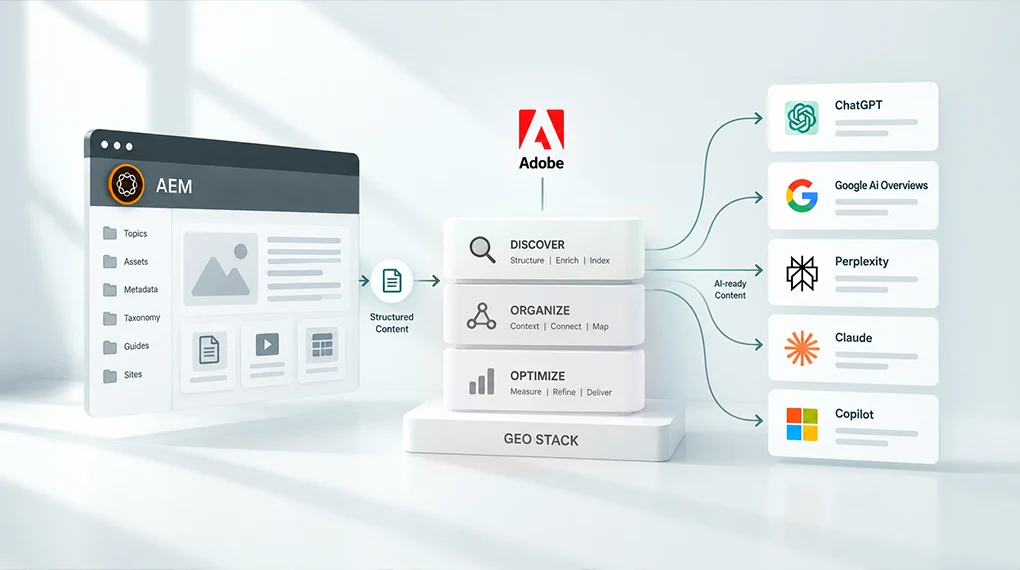
Adobe Brand Visibility is Adobe’s GEO stack: a unified platform that monitors how your brand appears across AI search engines, identifies what’s blocking visibility and deploys fixes directly to your AEM environment without requiring an engineering sprint. It works, but only as well as the AEM setup underneath it. This post explains what the platform does and what your AEM environment needs to have in place before it delivers full value.
What Adobe Built and Why It Matters Now
For most of the past decade, enterprise marketing teams optimized for one thing: ranking in Google search results. The playbook was well understood. Keywords, backlinks, page speed, structured data. The work was measurable and the outcomes were predictable.
That old playbook still works about as well as it ever did. It just doesn’t cover where customers are looking anymore.
AI-powered search is now a primary discovery channel. Adobe Digital Insights has tracked AI traffic to U.S. retail sites surging 1,324 percent between October 2024 and May 2026, with travel growing even faster at 2,215 percent over the same span. When a potential customer asks ChatGPT, Perplexity or Google AI Mode which platform is best for enterprise content management, which vendor leads for regulated industries or what the difference is between two competing products, they aren’t getting a ranked list of links. They’re getting a synthesized answer. Your brand is either in that answer or it isn’t.
Adobe recognized this shift and built an entire product layer to address it. The result is Adobe Brand Visibility, announced June 17, 2026, as part of Adobe CX Enterprise. It combines the capabilities of Adobe LLM Optimizer with Semrush’s AI search database of nearly 300 million real AI search prompts in a single enterprise workflow. AEM customers don’t need to be sold on using it. The harder question is whether their AEM environment is set up to get the most from it.
What Adobe Brand Visibility Actually Does
Understanding the product before understanding the AEM requirements makes the connection between the two clearer.
AI Visibility Monitoring
Adobe Brand Visibility tracks brand visibility across at least 10 LLM families, including ChatGPT, Perplexity, Google AI Mode, Anthropic Claude and Microsoft Copilot, with competitive share-of-voice benchmarking against up to five direct competitors. It tells you not just whether your brand appears in AI answers, but how prominently, how accurately and against which queries.
This monitoring layer uses CDN log analysis to identify AI agent traffic. That’s significant because standard analytics platforms can’t see AI bot traffic clearly. Adobe Brand Visibility can, and it connects that traffic to downstream engagement and revenue through native Adobe Analytics and Customer Journey Analytics integrations.
Citation Readability Scoring
The product includes a Citation Readability Score for each page, showing how much of your content AI agents can actually read and use. A companion Chrome extension, the AI Content Visibility Checker, lets teams run this check on any page without a product license. Practitioner guidance from Adobe frames a side-by-side comparison of what AI agents see versus what human visitors see as one of the most persuasive artifacts you can bring to a GEO investment conversation, particularly on your highest-value pages.
Opportunity Identification and Deployment
Adobe Brand Visibility surfaces prioritized recommendations and enables teams to act on them immediately. Fixes deploy in two ways: at the CDN edge in minutes without a CMS update, or through CMS updates for durable changes that persist. CDN edge deployment targets AI agents only and has no effect on the human visitor experience or existing SEO signals.
The platform also covers off-site optimization: generating content for Wikipedia, YouTube, Reddit and earned media to expand citation authority on the third-party surfaces LLMs weight most heavily when forming answers.
Revenue Measurement
The Adobe Analytics integration connects every GEO optimization directly to conversions and revenue, with server-level confirmation that AI bots read the updated content. This moves GEO from a brand awareness exercise to a measurable growth initiative with numbers leadership already trusts.
The AEM Requirements That Determine How Much You Get From It
Adobe Brand Visibility is available as a free trial for AEM Cloud Service, Adobe Analytics and Customer Journey Analytics customers. Customers who activated before April 1, 2026 keep up to 200 prompts under their original terms. Everyone else gets up to 100 prompts, one domain and optimizations across up to 50 URLs for a single opportunity type. For most enterprise AEM teams, though, licensing isn’t what slows this down. Their AEM environment is.
Key products supporting the solution include AEM Sites, AEM Sites Optimizer and Adobe Brand Visibility working together. They’re designed as an integrated stack. The monitoring layer shows you the gaps. The optimization layer closes them. But the underlying AEM environment determines how wide those gaps are in the first place.
Here’s what matters most.
1. Content Must Be Readable by AI Crawlers
This is the most immediate and most frequently overlooked requirement. AI agents can’t cite content they can’t read.
JavaScript-rendered content, gated pages, assets without text equivalents and pages that block AI crawlers in robots.txt are invisible to AI search regardless of their quality. According to Adobe’s data on US retail site AI readability, the average homepage scores only 75 percent on AI content readability. That means roughly a quarter of homepage content is effectively hidden from the AI systems your brand depends on for discovery.
For AEM teams, the most common readability gaps show up in a handful of predictable places. Single Page Applications that render content in JavaScript rather than serving it as static HTML top the list. Pages that don’t include server-rendered fallback content for AI agent user agents are a close second. DAM assets, PDFs and video content without machine-readable text equivalents create another blind spot, and robots.txt configurations that inadvertently block AI crawlers alongside other bots round it out.
Adobe’s own guidance points to a consistent fix for the SPA problem: adding a server-rendered block on every page template containing an AI-readable summary. Simple to implement. High impact. (#LINK-TBD: source claim needs Mitch’s confirmation, see pipeline report)
2. Content Structure Determines Extractability
AI systems don’t read pages the way human visitors do. They extract facts, assess credibility and synthesize answers from multiple sources. For that extraction to work accurately, content needs clear structure: direct answers near the top of the page, consistent entity naming and organized headings that signal what each section covers.
AEM’s content fragment and experience fragment architecture is well-suited to this when it’s used correctly. Content fragments that are built around structured fields with consistent naming produce more reliable AI citations than pages built as free-form rich text. The content model decisions made during AEM implementation, or during a migration, directly affect how well AI systems can extract and use your content.
For teams thinking through how content architecture connects to AI visibility, this post on what AI search actually looks for in your content covers the structural signals that determine whether content gets cited or skipped.
3. Metadata Consistency Across the DAM
Brand Visibility identifies content gaps based on real AI search prompts. When it recommends adding a page or updating existing content to address a visibility gap, that content needs to be findable, reusable and correctly tagged inside your AEM environment to be deployed quickly.
A DAM with inconsistent taxonomy or missing metadata makes that process slower and less reliable. The right asset for a given gap may already exist in your DAM. If it can’t be found because the tagging is inconsistent, the optimization cycle extends from minutes to days.
For teams still working through DAM governance and taxonomy decisions, this post on why your content supply chain, not your content team, is the real bottleneck covers how metadata decisions upstream affect content velocity downstream, which is exactly the dynamic that GEO optimization surfaces.
4. AEM Cloud Service Shapes Your Trial Path, Not Your Deployment Ceiling
The free trial gate described above is the main AEM-specific eligibility rule, and it’s worth separating from a claim that circulates often and isn’t accurate: that CDN edge deployment only works for AEM. It doesn’t. Optimize at Edge, the feature that pushes fixes live in minutes without a CMS update, is CDN-agnostic and CMS-agnostic. It’s documented to work with Fastly, Akamai and Cloudflare, on any content management system.
Where AEM does matter is setup friction. AEM Cloud Service customers on Adobe’s managed Fastly get a self-serve, close to one-click routing setup inside the Brand Visibility UI. Fastly customers running their own instance configure it through VCL snippets instead, which typically means pulling in a developer. The same is true for Akamai and Cloudflare. So the practical AEM advantage isn’t exclusivity. It’s that AEM Cloud Service on managed Fastly is the fastest path from opportunity to live fix, with the least engineering involved.
For teams weighing what their current deployment model means for broader AI agent access, our post on AEM 6.5 end of support and the three paths forward digs into what each option means for platform capability going forward.
5. AEM Edge Delivery Services Teams Have a Head Start
AEM Edge Delivery Services teams already have a meaningful advantage in AI search visibility. EDS produces clean, server-rendered HTML by default. The 100 Lighthouse score that EDS achieves as a baseline reflects exactly the kind of fast, well-structured, fully readable pages that AI agents cite most reliably.
EDS’s plain JavaScript and CSS front-end model also eliminates the SPA rendering problem that creates the largest AI readability gaps in traditional AEM Sites implementations. If you’re on EDS, your pages are already structured to be read by AI. Brand Visibility lets you measure and optimize that advantage rather than first diagnosing why content is invisible.
For teams evaluating a move to EDS as part of their broader AI readiness strategy, this post on how AEM hits a 100 Lighthouse score with Edge Delivery Services covers the performance architecture that makes EDS the strongest starting point for GEO work.
What This Looks Like in Practice
Before Brand Visibility’s wider launch, Adobe’s own marketing team ran the underlying LLM Optimizer technology on Adobe.com, testing it against the Firefly and Acrobat landing pages. The team identified gaps in how product descriptions, ratings and reviews were surfacing in AI answers. Automated recommendations resolved the issues without disrupting the visitor experience. Within one week, citations increased by five times for Adobe Firefly. Adobe Acrobat saw a 200 percent increase in LLM visibility versus competitors, and a 41 percent increase in LLM-referred traffic to Adobe.com pages.
Those numbers reflect what happens when Brand Visibility runs on top of an AEM environment with clean content structure, readable pages and consistent metadata. The tool identified the specific gaps. The AEM infrastructure allowed them to be fixed quickly. The result was measurable within a week.
In our work with enterprise AEM environments, the organizations seeing the fastest GEO returns from Brand Visibility are consistently the ones that addressed content readability and metadata consistency before activation, not alongside it.
The Starting Point
Adobe Brand Visibility is live now, with a free trial open to AEM Cloud Service, Adobe Analytics and Customer Journey Analytics customers. Before activating, the most useful first step is running the AI Content Visibility Checker on your 10 highest-value pages. Product pages, solution descriptions, thought leadership content, pricing pages and FAQs are the highest-priority targets. The Citation Readability Score for each page tells you exactly how much of your content AI agents can currently use.
That score is your baseline. It tells you whether your AEM environment is ready to get full value from Brand Visibility immediately, or whether content readability and metadata work needs to happen first.
For teams who want help mapping their current AEM setup against Brand Visibility’s requirements and identifying where the fastest GEO gains sit, a Focus Area Audit is the right starting point.
Frequently Asked Questions
Adobe Brand Visibility is the evolution of Adobe LLM Optimizer, launched June 17, 2026 after Adobe combined it with Semrush’s AI search intelligence following Adobe’s acquisition of Semrush, completed April 28, 2026. It combines AI visibility monitoring, content optimization and revenue measurement in a single platform. The core GEO functionality is the same; the intelligence layer is significantly expanded.
The free trial requires AEM Cloud Service, Adobe Analytics or Customer Journey Analytics. Once you’re using the product, the monitoring, analysis and CDN edge deployment capabilities are CMS-agnostic. Optimize at Edge works with Fastly, Akamai or Cloudflare regardless of what CMS sits behind them. AEM Cloud Service customers on Adobe’s managed Fastly get the simplest setup: a self-serve, near one-click flow. Everyone else configures it through CDN-specific steps, usually with a developer’s help.
The monitoring and citation readability analysis work for any publicly accessible site regardless of CMS. The free trial is gated to AEM Cloud Service, Adobe Analytics or Customer Journey Analytics customers, so an on-premise AEM 6.5 environment without one of those wouldn’t qualify for the trial on its own. For the paid product, CDN edge deployment isn’t limited to AEM. If your site sits behind Fastly, Akamai or Cloudflare, Optimize at Edge is available regardless of what’s on-premise or in the cloud. Confirm current trial and licensing terms with your Adobe rep before committing content ops time to it.
CDN edge optimizations deploy in minutes and include server-level confirmation that AI bots read the updated content. CMS-based updates follow normal publishing workflows. Adobe Brand Visibility includes rollback capability for CDN edge changes, with no impact on the human visitor experience or existing SEO signals.
AEM Sites Optimizer focuses on technical site performance, Core Web Vitals and SEO health inside AEM. Adobe Brand Visibility focuses on AI search visibility, citation monitoring and GEO optimization. Both are positioned as working together as part of the broader brand visibility stack alongside AEM Sites and Adobe Analytics.